-- 建立模擬資料
if exists(select * from tempdb.dbo.sysobjects where id = object_id('tempdb.dbo.#temp') )
drop table #temp
create table #temp (
sno varchar(10), --學號
class varchar(10), --科目
num int --分數
)
insert into #temp
select '001', '國', 80
union select '001', '英', 90
union select '001', '數', 55
union select '002', '國', 50
union select '002', '英', 60
union select '002', '數', 75
union select '003', '英', 98
union select '003', '數', 59
union select '004', '國', 88
union select '004', '英', 98
union select '005', '國', 58
union select '005', '數', 69
union select '006', '國', 78
union select '006', '英', 84
union select '006', '數', 59
print '資料表列'
select * from #temp
-- 多筆相同鍵值的欄位內容合併
select a.sno, (
stuff((
select ','+class+' '+convert(varchar(10),num )
from #temp b
where a.sno=b.sno
for xml path('')
), 1,1,'')
) class
from #temp a
group by a.sno
select distinct a.sno, (
stuff((
select ','+class+' '+convert(varchar(10),num )
from #temp b
where a.sno=b.sno
for xml path('')
), 1,1,'')
) class
from #temp a
-- 陣列欄位查詢方式
if exists(select * from tempdb.dbo.sysobjects where id = object_id('tempdb.dbo.#t2') )
drop table #t2
create table #t2 (
pName varchar(10), --條件名稱
numAry varchar(10) --分數條件陣列
)
insert into #t2
select 'p1', '80'
union select 'p2', '80,90,100'
union select 'p3', '50,58,98'
select * from #t2
select * from #temp
-- 測試查詢 使用 charindex <<正常>> ; 但 changeClass 只能為 1 筆, 否則異常
select * from #temp t
where charindex(cast(num as varchar),(select top 1 numAry from #t2 ))>0
-- 測試查詢 使用 charindex + for xml path('') <<正常>> ; 但 changeClass 可以為多筆
select * from #temp t
where charindex(cast(num as varchar),(
stuff((
select ','+numAry
from #t2
where 1=1 -- 可設定條件
and pName in ('p3')
for xml path('')
), 1,1,'')
))>0
/*
-- 查詢結果
sno class num
002 國 50
003 英 98
004 英 98
005 國 58
*/
2016年1月21日 星期四

2011年8月29日 星期一
html轉xls中的數字問題處理
這是一個長久以來的問題,就是使用html轉成xls表,原本補0的資料在欄位內會被自動吃掉。
就是原本的資料是 "00123" 轉出後資料變成 "123"了。
在google大神的幫助下,找到了 http://blog.xuite.net/alenliu/test/27513469 網誌介紹了一些方法終於得以不再讓資料亂變了。
使用的方法即為 使用 style處理語法如下:
這是最簡單的方法,在內設好,轉出的表格內容資料就不會再亂變了。
就是原本的資料是 "00123" 轉出後資料變成 "123"了。
在google大神的幫助下,找到了 http://blog.xuite.net/alenliu/test/27513469 網誌介紹了一些方法終於得以不再讓資料亂變了。
使用的方法即為 使用 style處理語法如下:
這是最簡單的方法,在內設好,轉出的表格內容資料就不會再亂變了。
2009年12月22日 星期二
javascript日期檢查
相關網址:JAVAScript中使用正則表達式檢測日期格式
<script type="text/javascript">
//彭嘉宏的日期格式檢查(使用正則式)
function dateVerify(date){
var reg = /^(\d{4})([\/,-])(\d{1,2})\2(\d{1,2})$/;
var r = date.match(reg);
if(r==null) return false;
var d= new Date(r[1], r[3]-1,r[4]);
var newStr=d.getFullYear()+r[2]+(d.getMonth()+1)+r[2]+d.getDate();
date=r[1]+r[2]+((r[3]-1)+1)+r[2]+((r[4]-1)+1);
return newStr==date;
}
//ChanPing的日期格式檢查(使用Date()判斷)
function dateVerify2(date){
var d= new Date(date.split("-").join("/"));
var r= date.split("-").join("/").split("/");
return d.getDate()==r[2]; //判斷日
}
</script>
<input type="text" name="t1" style="background-color:#FFFFFF;" value="2009-02-30" />
<input type=button value="判斷日期dateVerify()" style="color=blue; font-size=10pt;width=130pt" onclick="alert(this.value+' is '+dateVerify(t1.value))" >
<input type=button value="判斷日期dateVerify2()" style="color=blue; font-size=10pt;width=130pt" onclick="alert(this.value+' is '+dateVerify2(t1.value))" >
<script type="text/javascript">
//彭嘉宏的日期格式檢查(使用正則式)
function dateVerify(date){
var reg = /^(\d{4})([\/,-])(\d{1,2})\2(\d{1,2})$/;
var r = date.match(reg);
if(r==null) return false;
var d= new Date(r[1], r[3]-1,r[4]);
var newStr=d.getFullYear()+r[2]+(d.getMonth()+1)+r[2]+d.getDate();
date=r[1]+r[2]+((r[3]-1)+1)+r[2]+((r[4]-1)+1);
return newStr==date;
}
//ChanPing的日期格式檢查(使用Date()判斷)
function dateVerify2(date){
var d= new Date(date.split("-").join("/"));
var r= date.split("-").join("/").split("/");
return d.getDate()==r[2]; //判斷日
}
</script>
<input type="text" name="t1" style="background-color:#FFFFFF;" value="2009-02-30" />
<input type=button value="判斷日期dateVerify()" style="color=blue; font-size=10pt;width=130pt" onclick="alert(this.value+' is '+dateVerify(t1.value))" >
<input type=button value="判斷日期dateVerify2()" style="color=blue; font-size=10pt;width=130pt" onclick="alert(this.value+' is '+dateVerify2(t1.value))" >
2009年10月15日 星期四
SQL處理中英文字串長度的範例
SQL處理中英文字串長度的範例
-- 計算中英文字串長度
DECLARE @string varchar(50)
set @string='一二三456七八9十'
select @string '字串', len(@string) '中英字數', datalength(@string) '資料長度', datalength(@string)-len(@string) '中文字數'
-- 截取中英文字串長度
DECLARE @string varchar(50), @l int
set @string='一二三456七八9十'
set @l=8
select substring(@string,1,@l) '取字數', case when datalength(@string)>8 then convert(varchar(8),@string)+'...' else convert(varchar(8),@string) end '取資料數'
select substring(@string,1,@l)
-- 無法使用下列寫法,主要在「convert(varchar(@l),@string)」內的『varchar(@l)』括號內只可使用數值,無法使用變數 >"<。
select substring(@string,1,@l), case when datalength(@string) > @l then convert(varchar(@l),@string)+'...' else convert(varchar(@l),@string) end
-- 計算中英文字串長度
DECLARE @string varchar(50)
set @string='一二三456七八9十'
select @string '字串', len(@string) '中英字數', datalength(@string) '資料長度', datalength(@string)-len(@string) '中文字數'
-- 截取中英文字串長度
DECLARE @string varchar(50), @l int
set @string='一二三456七八9十'
set @l=8
select substring(@string,1,@l) '取字數', case when datalength(@string)>8 then convert(varchar(8),@string)+'...' else convert(varchar(8),@string) end '取資料數'
select substring(@string,1,@l)
-- 無法使用下列寫法,主要在「convert(varchar(@l),@string)」內的『varchar(@l)』括號內只可使用數值,無法使用變數 >"<。
select substring(@string,1,@l), case when datalength(@string) > @l then convert(varchar(@l),@string)+'...' else convert(varchar(@l),@string) end
2009年10月14日 星期三
EXCEL的資料轉置(橫轉直)
EXCEL的資料轉置(橫轉直, 直轉橫)
常會有要整理資料表,要將原本橫向的資料欄位改為直向的資料顯示又常會忘記,所以,特寫這篇圖文註記一下 ^^!!!
1.範例資料如下: 要將 A1..E4的資料轉成直式顯示。
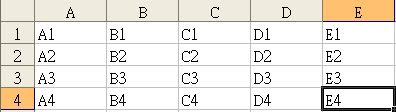
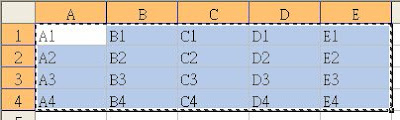
2.選取A1..E4的資料。按右鍵 ->「複製(C)」將資料複製。
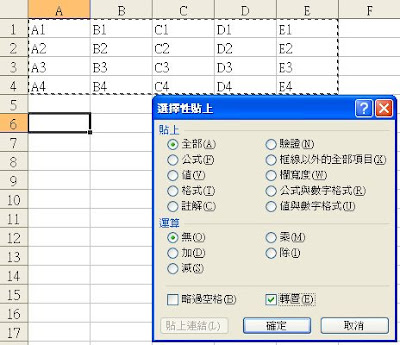
3.點擊A6位置。按右鍵 -> 「選擇性貼上(S)...」。
4.開啟『選擇性貼上』框後,勾選「轉置(E)」後,按下「確定」鈕。

常會有要整理資料表,要將原本橫向的資料欄位改為直向的資料顯示又常會忘記,所以,特寫這篇圖文註記一下 ^^!!!
1.範例資料如下: 要將 A1..E4的資料轉成直式顯示。

2.選取A1..E4的資料。按右鍵 ->「複製(C)」將資料複製。

3.點擊A6位置。按右鍵 -> 「選擇性貼上(S)...」。
4.開啟『選擇性貼上』框後,勾選「轉置(E)」後,按下「確定」鈕。

5.如下圖A6..D10的顯示,即完成了資料的轉向了^^。

2009年10月9日 星期五
暫存表判斷 / 產生日期暫存表
參考網址:http://www.blueshop.com.tw/board/show.asp?subcde=BRD20050616212814W4M&fumcde=FUM20041006152735ZFS
-- #暫存表判斷並刪除
IF OBJECT_ID('tempdb..#tmpDate') IS NOT NULL
DROP TABLE #tmpDate
go
DECLARE @sd datetime --開始日期
DECLARE @ed datetime --結束日期
DECLARE @d1 datetime --處理日期
DECLARE @d2 varchar --處理民國日期
set @sd='2008-09-11'
set @ed='2009-01-14'
set @d1=@sd
-- 先轉一筆資料入 #tmpDate 暫存表 drop table #tmpDate
select D_date '西元日期', weeknum '星期別', convert(varchar(4),DATEPART ("year", @d1)-1911)+right(replace(D_date,'-','/'),6) '民國日期' into #tmpDate
from(select convert(varchar(10),@d1,121) D_date, DATEPART ( "weekday" , @d1 )-1 weeknum ) a
select @d1=DATEADD("day" , 1, @d1 ) --加一天
WHILE (@d1 <= @ed) BEGIN insert into #tmpDate select *, convert(varchar(4),DATEPART ("year", @d1)-1911)+right(replace(D_date,'-','/'),6) C_date from(select convert(varchar(10),@d1,121) D_date, DATEPART ( "weekday" , @d1 )-1 weeknum ) a select @d1=DATEADD("day" , 1, @d1 ) END -- 顯示暫存表
select * from #tmpDate
order by [西元日期]
-- #暫存表判斷並刪除
IF OBJECT_ID('tempdb..#tmpDate') IS NOT NULL
DROP TABLE #tmpDate
go
DECLARE @sd datetime --開始日期
DECLARE @ed datetime --結束日期
DECLARE @d1 datetime --處理日期
DECLARE @d2 varchar --處理民國日期
set @sd='2008-09-11'
set @ed='2009-01-14'
set @d1=@sd
-- 先轉一筆資料入 #tmpDate 暫存表 drop table #tmpDate
select D_date '西元日期', weeknum '星期別', convert(varchar(4),DATEPART ("year", @d1)-1911)+right(replace(D_date,'-','/'),6) '民國日期' into #tmpDate
from(select convert(varchar(10),@d1,121) D_date, DATEPART ( "weekday" , @d1 )-1 weeknum ) a
select @d1=DATEADD("day" , 1, @d1 ) --加一天
WHILE (@d1 <= @ed) BEGIN insert into #tmpDate select *, convert(varchar(4),DATEPART ("year", @d1)-1911)+right(replace(D_date,'-','/'),6) C_date from(select convert(varchar(10),@d1,121) D_date, DATEPART ( "weekday" , @d1 )-1 weeknum ) a select @d1=DATEADD("day" , 1, @d1 ) END -- 顯示暫存表
select * from #tmpDate
order by [西元日期]
2009年7月14日 星期二
SQL定序衝突問題處理
SQL語法查詢,發生「定序衝突問題」時,訊息如下:
「無法解析 equal to 作業中 "Chinese_Taiwan_Stroke_CI_AS" 與 "Chinese_Taiwan_Stroke_CI_AS_WS" 之間的定序衝突。」
這時必須將相關的資料定序調整,使用的方式如下:
原條件為
a=b
修改後為
cast(a as varchar)COLLATE Chinese_Taiwan_Stroke_CI_AS =cast(b as varchar)COLLATE Chinese_Taiwan_Stroke_CI_AS
將定序調整一致後,就不會有問題了。
「無法解析 equal to 作業中 "Chinese_Taiwan_Stroke_CI_AS" 與 "Chinese_Taiwan_Stroke_CI_AS_WS" 之間的定序衝突。」
這時必須將相關的資料定序調整,使用的方式如下:
原條件為
a=b
修改後為
cast(a as varchar)COLLATE Chinese_Taiwan_Stroke_CI_AS =cast(b as varchar)COLLATE Chinese_Taiwan_Stroke_CI_AS
將定序調整一致後,就不會有問題了。
2009年7月2日 星期四
SQL小數四捨五入範例
-- 四捨五入範例
-- 使用「numeric 型態」做小數四捨五入進位處理
--------------------------------------------------------------------------------------------
declare @a1 float, @b1 float, @c1 float, @d1 float, @e1 float
declare @a2 float, @b2 float, @c2 float, @d2 float, @e2 float
/*設定變數初值*/
select @a1 = 0.334, @a2 = 0.335
select @b1 = 0.444, @b2 = 0.445
select @c1 = 0.554, @c2 = 0.455
select @d1 = 0.664, @d2 = 0.465
select @e1 = 0.774, @e2 = 0.475
select @a1 a, @b1 b, @c1 c, @d1 d, @e1 e
select @a2, @b2, @c2, @d2, @e2
print '使用 numeric 型態做小數四捨五入進位處理'
select convert(numeric(5,2),@a1), convert(numeric(5,2),@b1), convert(numeric(5,2),@c1), convert(numeric(5,2),@d1), convert(numeric(5,2),@e1)
select convert(numeric(5,2),@a2), convert(numeric(5,2),@b2), convert(numeric(5,2),@c2), convert(numeric(5,2),@d2), convert(numeric(5,2),@e2)
--------------------------------------------------------------------------------------------
-- 整數相除的小數處理範例
--------------------------------------------------------------------------------------------
declare @a int
declare @b int
declare @c int, @d int, @e int
/*設定變數初值*/
select @a = 1000
select @b = 3
select @c = 43
select @d = 6
select @e = 7
select @a/@b t1, @a/@c t2, @a/@b*1.0 t3, 1.0*@a/@b b, 1.0*@a/@c c, 1.0*@a/@d d, 1.0*@a/@e e
, convert(numeric(5,2),(1.0*@a/@b)) b1
, convert(numeric(5,2),(1.0*@a/@c)) c1
, convert(numeric(5,2),(1.0*@a/@d)) d1
, convert(numeric(5,2),(1.0*@a/@e)) e1
-- 使用「numeric 型態」做小數四捨五入進位處理
--------------------------------------------------------------------------------------------
declare @a1 float, @b1 float, @c1 float, @d1 float, @e1 float
declare @a2 float, @b2 float, @c2 float, @d2 float, @e2 float
/*設定變數初值*/
select @a1 = 0.334, @a2 = 0.335
select @b1 = 0.444, @b2 = 0.445
select @c1 = 0.554, @c2 = 0.455
select @d1 = 0.664, @d2 = 0.465
select @e1 = 0.774, @e2 = 0.475
select @a1 a, @b1 b, @c1 c, @d1 d, @e1 e
select @a2, @b2, @c2, @d2, @e2
print '使用 numeric 型態做小數四捨五入進位處理'
select convert(numeric(5,2),@a1), convert(numeric(5,2),@b1), convert(numeric(5,2),@c1), convert(numeric(5,2),@d1), convert(numeric(5,2),@e1)
select convert(numeric(5,2),@a2), convert(numeric(5,2),@b2), convert(numeric(5,2),@c2), convert(numeric(5,2),@d2), convert(numeric(5,2),@e2)
--------------------------------------------------------------------------------------------
-- 整數相除的小數處理範例
--------------------------------------------------------------------------------------------
declare @a int
declare @b int
declare @c int, @d int, @e int
/*設定變數初值*/
select @a = 1000
select @b = 3
select @c = 43
select @d = 6
select @e = 7
select @a/@b t1, @a/@c t2, @a/@b*1.0 t3, 1.0*@a/@b b, 1.0*@a/@c c, 1.0*@a/@d d, 1.0*@a/@e e
, convert(numeric(5,2),(1.0*@a/@b)) b1
, convert(numeric(5,2),(1.0*@a/@c)) c1
, convert(numeric(5,2),(1.0*@a/@d)) d1
, convert(numeric(5,2),(1.0*@a/@e)) e1
2009年3月19日 星期四
輸入法由注音改為倉頡先出來
輸入法由注音改為倉頡先出來
緣起:
我是一個倉頡打字的人,或許你也跟我一樣偶而會有拆不出字碼,只好改注音輸入,然後,眼,盯著鍵盤、口中不斷的發著要拆的字音,最後,好不容易打出要拆的注音符號。這是時而發生的事,所以,我們也會增加一個「注音」輸入法,但,問題來了,「注音」每次都在我「英數」和「倉頡」輸入法中間擋住,就一定還要再切換一下才會跳到我可愛的「倉頡」輸入法上來。天呀!!死微軟幾時才能讓Windows可以聰明一點,我要「倉頡」先出來啦!! >"< 遍巡google都找不到可以解決我問題的方法,最後,也不可考了,下列是我目剈前找到可以改善我問題的解決方法。直接改 regedit 系統設定,總算ok了。在這分享給跟我有一樣困擾的人。 ^^
多年後的發現:
機碼路徑:
HKEY_USERS\S-1-5-21-1547161642-412668190-1801674531-500\Keyboard Layout\Preload
設定的資料調整一下也許可以令人滿意!!(調好記得要重開機一下)
Windows98 登錄編輯器
機碼名稱:
HKEY_LOCAL_MACHINE\
System\
CurrentControlSet\
Control\
Keyboard Layouts\
E0010404
==>E0010404
名稱 資料
-------------------------------------
IME file PHON.IME
layout file kbdus.kbd
layout text 注音
==>E0020404
名稱 資料
-------------------------------------
IME file CHAJEI.IME
layout file kbdus.kbd
layout text 倉頡
將上列的 E0010404 和 E0020404 內的資料互換;
重開機後 倉頡輸入法 將在 注音輸入法 之前
==============================================
WinXP SP3 20090127
==============================================
HKEY_LOCAL_MACHINE\SYSTEM\ControlSet001\Control\Keyboard Layouts\
==>E0010404
名稱 資料
-------------------------------------
IME file phon.ime
Layout Display Name @%SystemRoot%\system32\input.dll,-5066
layout file KBDUS.DLL
layout text 中文 (繁體) - 注音
==>E0020404
名稱 資料
-------------------------------------
IME file chajei.ime
Layout Display Name @%SystemRoot%\system32\input.dll,-5067
layout file KBDUS.DLL
layout text 中文 (繁體) - 倉頡
將上列的 E0010404 和 E0020404 內的資料互換;
重開機後 倉頡輸入法 將在 注音輸入法 之前
緣起:
我是一個倉頡打字的人,或許你也跟我一樣偶而會有拆不出字碼,只好改注音輸入,然後,眼,盯著鍵盤、口中不斷的發著要拆的字音,最後,好不容易打出要拆的注音符號。這是時而發生的事,所以,我們也會增加一個「注音」輸入法,但,問題來了,「注音」每次都在我「英數」和「倉頡」輸入法中間擋住,就一定還要再切換一下才會跳到我可愛的「倉頡」輸入法上來。天呀!!死微軟幾時才能讓Windows可以聰明一點,我要「倉頡」先出來啦!! >"< 遍巡google都找不到可以解決我問題的方法,最後,也不可考了,下列是我目剈前找到可以改善我問題的解決方法。直接改 regedit 系統設定,總算ok了。在這分享給跟我有一樣困擾的人。 ^^
多年後的發現:
機碼路徑:
HKEY_USERS\S-1-5-21-1547161642-412668190-1801674531-500\Keyboard Layout\Preload
設定的資料調整一下也許可以令人滿意!!(調好記得要重開機一下)
Windows98 登錄編輯器
機碼名稱:
HKEY_LOCAL_MACHINE\
System\
CurrentControlSet\
Control\
Keyboard Layouts\
E0010404
==>E0010404
名稱 資料
-------------------------------------
IME file PHON.IME
layout file kbdus.kbd
layout text 注音
==>E0020404
名稱 資料
-------------------------------------
IME file CHAJEI.IME
layout file kbdus.kbd
layout text 倉頡
將上列的 E0010404 和 E0020404 內的資料互換;
重開機後 倉頡輸入法 將在 注音輸入法 之前
==============================================
WinXP SP3 20090127
==============================================
HKEY_LOCAL_MACHINE\SYSTEM\ControlSet001\Control\Keyboard Layouts\
==>E0010404
名稱 資料
-------------------------------------
IME file phon.ime
Layout Display Name @%SystemRoot%\system32\input.dll,-5066
layout file KBDUS.DLL
layout text 中文 (繁體) - 注音
==>E0020404
名稱 資料
-------------------------------------
IME file chajei.ime
Layout Display Name @%SystemRoot%\system32\input.dll,-5067
layout file KBDUS.DLL
layout text 中文 (繁體) - 倉頡
將上列的 E0010404 和 E0020404 內的資料互換;
重開機後 倉頡輸入法 將在 注音輸入法 之前
2009年3月18日 星期三
MS SQL 資料表迴圈範例
print '資料表迴圈處理'
--產生暫存資料表 #score
if exists(select * from tempdb.dbo.sysobjects where id = object_id('tempdb.dbo.#score') )
drop table #score
create table #score (
sno varchar(10), --學號
class varchar(10), --科目
num int --分數
)
insert into #score
select '001', '國', 80
union select '001', '英', 90
union select '001', '數', 55
union select '002', '國', 50
union select '002', '英', 60
union select '002', '數', 75
union select '003', '英', 98
union select '003', '數', 59
union select '004', '國', 88
union select '004', '英', 98
union select '005', '國', 58
union select '005', '數', 69
union select '006', '國', 78
union select '006', '英', 84
union select '006', '數', 59
--select * from #score
print '資料表迴圈處理顯示'
DECLARE score_cursor CURSOR
FOR
SELECT distinct sno, class, num
FROM #score
order by sno, class
OPEN score_cursor
DECLARE @sno varchar(10) -- 學號變數
DECLARE @class varchar(10) -- 科目
DECLARE @num int -- 分數
FETCH NEXT FROM score_cursor INTO @sno, @class, @num
WHILE (@@FETCH_STATUS <> -1)
BEGIN
IF (@@FETCH_STATUS <> -2)
BEGIN
PRINT @sno+','+@class+','+convert(varchar(10),@num)
END
FETCH NEXT FROM score_cursor INTO @sno, @class, @num
END
CLOSE score_cursor
DEALLOCATE score_cursor
--產生暫存資料表 #score
if exists(select * from tempdb.dbo.sysobjects where id = object_id('tempdb.dbo.#score') )
drop table #score
create table #score (
sno varchar(10), --學號
class varchar(10), --科目
num int --分數
)
insert into #score
select '001', '國', 80
union select '001', '英', 90
union select '001', '數', 55
union select '002', '國', 50
union select '002', '英', 60
union select '002', '數', 75
union select '003', '英', 98
union select '003', '數', 59
union select '004', '國', 88
union select '004', '英', 98
union select '005', '國', 58
union select '005', '數', 69
union select '006', '國', 78
union select '006', '英', 84
union select '006', '數', 59
--select * from #score
print '資料表迴圈處理顯示'
DECLARE score_cursor CURSOR
FOR
SELECT distinct sno, class, num
FROM #score
order by sno, class
OPEN score_cursor
DECLARE @sno varchar(10) -- 學號變數
DECLARE @class varchar(10) -- 科目
DECLARE @num int -- 分數
FETCH NEXT FROM score_cursor INTO @sno, @class, @num
WHILE (@@FETCH_STATUS <> -1)
BEGIN
IF (@@FETCH_STATUS <> -2)
BEGIN
PRINT @sno+','+@class+','+convert(varchar(10),@num)
END
FETCH NEXT FROM score_cursor INTO @sno, @class, @num
END
CLOSE score_cursor
DEALLOCATE score_cursor
2008年8月7日 星期四
Web 站台 主目錄 遠端共用位置設定問題
Web 站台 主目錄 遠端共用位置設定問題說明:
當 IIS 的 Web 站台 主目錄 設定在 遠端共用位置(如: \\server\webpage\wwwroot )時,
如使用本機目錄(如 C:\Inetpub\wwwroot\dir01 共享 dir01)將會發生異常,
必須將 路徑改為 共用位置的寫法(如 \\127.0.0.1\dir01 ) 才能正常使用 aspx。
當 IIS 的 Web 站台 主目錄 設定在 遠端共用位置(如: \\server\webpage\wwwroot )時,
如使用本機目錄(如 C:\Inetpub\wwwroot\dir01 共享 dir01)將會發生異常,
必須將 路徑改為 共用位置的寫法(如 \\127.0.0.1\dir01 ) 才能正常使用 aspx。
2008年5月5日 星期一
關於Access在使用 join 時的問題
話說雖然 Access 和 MS-SQL 都是同一家出的產品,但在 MS-SQL 上可以執行的指令行,硬是在 Access 上就是出現錯誤?! 下面我例出二個我常用的 Join 方式,在 MS-SQL 執行正常;但在 Access 卻會出現錯誤的實例:
例一:
-- MS-SQL 上的指令
select * from a
join b on a.id = b.id
-- 在 Access 上請調整如下
select * from a
inner join b on a.id = b.id -- 要將 join 改為 inner join
例二:
-- MS-SQL 上的指令
select * from a
join b on a.id = b.id
join c on a.id = c.id
-- 在 Access 上,我們有了剛才的經驗,將指令調整了如下
select * from a
inner join b on a.id = b.id
inner join c on a.id = c.id
-- 非常遺憾 !! 在 Access 上執行上列的指令還是會出現 錯誤 "查詢運算式 '......' 中的語法錯誤(少了運算元)。"

-- 就在 失望中,打開了 Access 的查詢,用 "設計檢視" 的方式做了一下,居然是可以的,真是 莫名其妙
-- 打開 Access 的 "SQL 檢視" 後,才知道 原來要加 括號 >"<
select * from ( a
inner join b on a.id = b.id )
inner join c on a.id = c.id
例一:
-- MS-SQL 上的指令
select * from a
join b on a.id = b.id
-- 在 Access 上請調整如下
select * from a
inner join b on a.id = b.id -- 要將 join 改為 inner join
例二:
-- MS-SQL 上的指令
select * from a
join b on a.id = b.id
join c on a.id = c.id
-- 在 Access 上,我們有了剛才的經驗,將指令調整了如下
select * from a
inner join b on a.id = b.id
inner join c on a.id = c.id
-- 非常遺憾 !! 在 Access 上執行上列的指令還是會出現 錯誤 "查詢運算式 '......' 中的語法錯誤(少了運算元)。"

-- 就在 失望中,打開了 Access 的查詢,用 "設計檢視" 的方式做了一下,居然是可以的,真是 莫名其妙
-- 打開 Access 的 "SQL 檢視" 後,才知道 原來要加 括號 >"<
select * from ( a
inner join b on a.id = b.id )
inner join c on a.id = c.id
2008年4月21日 星期一
MSSQL UNICODE 數值處理
相關參考:SQL Server 線上說明
MSSQL UNICODE 數值處理 資料變數範例
DECLARE @position int, @string varchar(50)
SET @position = 1
SET @string = 'ABC123 一二三abc' --測試字串
print DATALENGTH(@string)
WHILE @position <= DATALENGTH(@string)
BEGIN
SELECT @position 'no.', CONVERT(varchar(50), SUBSTRING(@string, @position, 1)) '字元' ,UNICODE(SUBSTRING(@string, @position, 1)) 'UNICODE數值' ,NCHAR(UNICODE(SUBSTRING(@string, @position, 1))+2) 'UNICODE數值+2字元' ,UNICODE(SUBSTRING(@string, @position, 1))+2 'UNICODE數值+2'
-- 判斷下一字元 是否為 NULL 值, NULL值就不做了
IF SUBSTRING(@string, @position+1, 1) is null
SELECT @position = DATALENGTH(@string) + 1 -- NULL 跳出
ELSE
SELECT @position = @position + 1 -- no+1
END
MSSQL UNICODE 數值處理 資料變數範例
DECLARE @position int, @string varchar(50)
SET @position = 1
SET @string = 'ABC123 一二三abc' --測試字串
print DATALENGTH(@string)
WHILE @position <= DATALENGTH(@string)
BEGIN
SELECT @position 'no.', CONVERT(varchar(50), SUBSTRING(@string, @position, 1)) '字元' ,UNICODE(SUBSTRING(@string, @position, 1)) 'UNICODE數值' ,NCHAR(UNICODE(SUBSTRING(@string, @position, 1))+2) 'UNICODE數值+2字元' ,UNICODE(SUBSTRING(@string, @position, 1))+2 'UNICODE數值+2'
-- 判斷下一字元 是否為 NULL 值, NULL值就不做了
IF SUBSTRING(@string, @position+1, 1) is null
SELECT @position = DATALENGTH(@string) + 1 -- NULL 跳出
ELSE
SELECT @position = @position + 1 -- no+1
END
Microsoft Visual Studio 2005 找不到 「即時運算」視窗的處理
Microsoft Visual Studio 2005 找不到 「即時運算」視窗(Immediate Window)的處理
「即時運算」視窗,應該有很多人會覺得Visual Studio內不是在「偵錯(D)」\「視窗(W)」內就有開啟「即時運算」視窗 這個功能了嗎?為何還要特別寫這篇?
原因是在上課時,大家都找到使用了,就是我找了半天 怎麼都沒找到,上google找也是沒有結果,所以才會想在這說明一下我的小發現和解決方式。
小發現是,如果你使用的 Visual Studio 2005 版本是 SP1的話,可能你也會跟我一樣發生同樣的問題(找不到 「即時運算」視窗)。

我們先來看看Visual Studio 2005沒有SP的版本,「即時運算」視窗 它放置的地方

再來看Visual Studio 2005 SP1 相同的位置
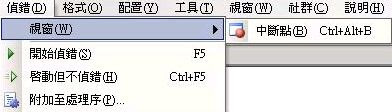
神奇吧! SP1 居然在相同位置的使用功能項少了二個,我們不管「輸出(O)」但「即時運算 Ctrl+G」確實不見了;怎麼辦?我要開「即時運算」來打指令呀!少了「即時運算」我要打哪呀!還好,我找到了將「即時運算」抓回來的方法:
1. 從「工具(T)」\「自訂(C)」開啟「自訂」視窗

2. 在「自訂」視窗選【命令(C)】頁籤,先在左邊的類別窗格內點選 [偵錯],在到右邊的命令窗格就可以找到 [即時運算] 了
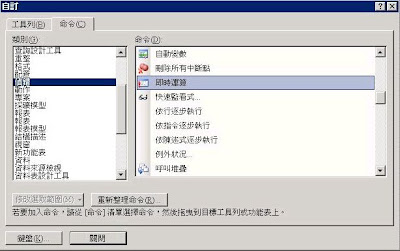
3. 再來就可依「自訂」視窗下面的指示,將 [即時運算] 拖曳到我們剛才看到的「偵錯(D)」\「視窗(W)」位置了

4. 完成

「即時運算」視窗,應該有很多人會覺得Visual Studio內不是在「偵錯(D)」\「視窗(W)」內就有開啟「即時運算」視窗 這個功能了嗎?為何還要特別寫這篇?
原因是在上課時,大家都找到使用了,就是我找了半天 怎麼都沒找到,上google找也是沒有結果,所以才會想在這說明一下我的小發現和解決方式。
小發現是,如果你使用的 Visual Studio 2005 版本是 SP1的話,可能你也會跟我一樣發生同樣的問題(找不到 「即時運算」視窗)。

我們先來看看Visual Studio 2005沒有SP的版本,「即時運算」視窗 它放置的地方

再來看Visual Studio 2005 SP1 相同的位置

神奇吧! SP1 居然在相同位置的使用功能項少了二個,我們不管「輸出(O)」但「即時運算 Ctrl+G」確實不見了;怎麼辦?我要開「即時運算」來打指令呀!少了「即時運算」我要打哪呀!還好,我找到了將「即時運算」抓回來的方法:
1. 從「工具(T)」\「自訂(C)」開啟「自訂」視窗

2. 在「自訂」視窗選【命令(C)】頁籤,先在左邊的類別窗格內點選 [偵錯],在到右邊的命令窗格就可以找到 [即時運算] 了

3. 再來就可依「自訂」視窗下面的指示,將 [即時運算] 拖曳到我們剛才看到的「偵錯(D)」\「視窗(W)」位置了

4. 完成

2008年3月31日 星期一
本機封裝DTS 備份 與 匯入
MSSQL2000 的 本機封裝DTS備份 與 匯入
本機封裝DTS備份
1. 開啟本機封裝以進入 封裝編輯頁
2. 點選 [封裝P] \ [另存新檔(A)…] 開啟【儲存DTS封裝】視窗
3. 在 「位置(L):」下拉清單 選 [結構化儲存體檔案];選好後下面的框即可直接輸入或以點 […] 的方式取得存檔路徑
4. 點選 [確定] 即完成備份作業
本機封裝DTS備份檔案匯入
1. 使用 SQL Server Enterprise Manager 資料庫路徑內的 [資料轉換服務]
2. 在 [資料轉換服務] 上 點 滑鼠右鍵 \ [開啟封裝(O)] 開啟【選擇封裝】視窗
3. 在 【選擇封裝】視窗中選取所要載入的封裝,完成後按 [確定] 以開啟封裝,進入 封裝編輯頁
4. 在 封裝編輯頁 內,點選 [封裝P] \ [另存新檔(A)…] 開啟【儲存DTS封裝】視窗
5. 在 「位置(L):」下拉清單 選 [SQL Server];選好後下面的框輸入要儲存至的Microsoft SQL Server 及 使用的 帳號、密碼
5. 點選 [確定] 即完成封裝DTS備份檔案匯入作業
本機封裝DTS備份
1. 開啟本機封裝以進入 封裝編輯頁
2. 點選 [封裝P] \ [另存新檔(A)…] 開啟【儲存DTS封裝】視窗
3. 在 「位置(L):」下拉清單 選 [結構化儲存體檔案];選好後下面的框即可直接輸入或以點 […] 的方式取得存檔路徑
4. 點選 [確定] 即完成備份作業
本機封裝DTS備份檔案匯入
1. 使用 SQL Server Enterprise Manager 資料庫路徑內的 [資料轉換服務]
2. 在 [資料轉換服務] 上 點 滑鼠右鍵 \ [開啟封裝(O)] 開啟【選擇封裝】視窗
3. 在 【選擇封裝】視窗中選取所要載入的封裝,完成後按 [確定] 以開啟封裝,進入 封裝編輯頁
4. 在 封裝編輯頁 內,點選 [封裝P] \ [另存新檔(A)…] 開啟【儲存DTS封裝】視窗
5. 在 「位置(L):」下拉清單 選 [SQL Server];選好後下面的框輸入要儲存至的Microsoft SQL Server 及 使用的 帳號、密碼
5. 點選 [確定] 即完成封裝DTS備份檔案匯入作業
2008年3月6日 星期四
產生資料表序號的方式
產生資料表序號的方式
------------------------------------------------------------------------
print '建範例表 #tmp1'
select * into #tmp1
from (
select '1' no, '101' class, 'A' type,'66' a1,'88' a2,'55' a3
union select '2','101','B','77','88','77'
union select '3','101','C','88','78','65'
union select '4','102','A','66','50','56'
union select '5','102','C','77','78','67'
) a
go
print '顯示 #tmp1 '
select * from #tmp1
------------------------------------------------------------------------
-- 4.產生資料表序號的方式 ps.要產生序號 的條件必須是唯一,否則可能產生重覆的序號
------------------------------------------------------------------------
select * from #tmp1
/*
原表
no class type a1 a2 a3
1 101 A 66 88 55
2 101 B 77 88 77
3 101 C 88 78 65
4 102 A 66 50 56
5 102 C 77 78 67
*/
print '4.1 希望依 class, type 的大小 重新產生序號 -- 顯示 可用在 insert '
select a.class, a.type, count(*) no
from #tmp1 a, #tmp1 b
where (a.class+a.type)>=(b.class+b.type)
group by a.class, a.type
order by a.class, a.type
/*
print '4.1 更新序號編號欄位'
update #tmp1 set no = (
select count(*) no
from #tmp1 b
where (#tmp1.class+#tmp1.type)>=(b.class+b.type)
)
*/
select a.class, a.a2
from #tmp1 a
order by a.class, a.a2
print '4.2.1 希望依 class, a2 的大小 重新產生序號 '
select a.class, a.a2, count(*) no
from #tmp1 a, #tmp1 b
where (a.class+a.a2)>=(b.class+b.a2)
group by a.class, a.a2
order by a.class, a.a2
/*
-- class, a2 的大小 發生 重覆的情況,造成重新產生序號異常
101 78 1
101 88 6
102 50 4
102 78 5
*/
print '4.2.2 由於 class, a2 發生重覆 所以要加條件 type 以使其變成 條件唯一'
select a.class, a.a2, count(*) no
from #tmp1 a, #tmp1 b
where (a.class+a.a2+a.type)>=(b.class+b.a2+b.type)
group by a.class, a.a2, a.type
order by a.class, a.a2
-- ps.可以以 group by 先來做 是否 唯一的判斷
print '使用 group by 來判斷 4.2 的兩個例子'
print '4.2.1 檢查'
select a.class, a.a2, count(*) no
from #tmp1 a
group by a.class, a.a2
having count(*)>1
order by a.class, a.a2
/*
101 88 2 -- 重覆資料
*/
print '4.2.2 檢查' select a.class, a.a2, a.type, count(*) no from #tmp1 a group by a.class, a.a2, a.type having count(*)>1
order by a.class, a.a2, a.type
/*
沒有重覆資料
*/
/*
print '4.2.3 更新序號編號欄位'
update #tmp1 set no = (
select count(*) no
from #tmp1 b
where (#tmp1.class+#tmp1.a2+#tmp1.type)>=(b.class+b.a2+b.type)
)
*/
select *
from #tmp1 a
/*
no class type a1 a2 a3
2 101 A 66 88 55
3 101 B 77 88 77
1 101 C 88 78 65
4 102 A 66 50 56
5 102 C 77 78 67
*/
------------------------------------------------------------------------
print '建範例表 #tmp1'
select * into #tmp1
from (
select '1' no, '101' class, 'A' type,'66' a1,'88' a2,'55' a3
union select '2','101','B','77','88','77'
union select '3','101','C','88','78','65'
union select '4','102','A','66','50','56'
union select '5','102','C','77','78','67'
) a
go
print '顯示 #tmp1 '
select * from #tmp1
------------------------------------------------------------------------
-- 4.產生資料表序號的方式 ps.要產生序號 的條件必須是唯一,否則可能產生重覆的序號
------------------------------------------------------------------------
select * from #tmp1
/*
原表
no class type a1 a2 a3
1 101 A 66 88 55
2 101 B 77 88 77
3 101 C 88 78 65
4 102 A 66 50 56
5 102 C 77 78 67
*/
print '4.1 希望依 class, type 的大小 重新產生序號 -- 顯示 可用在 insert '
select a.class, a.type, count(*) no
from #tmp1 a, #tmp1 b
where (a.class+a.type)>=(b.class+b.type)
group by a.class, a.type
order by a.class, a.type
/*
print '4.1 更新序號編號欄位'
update #tmp1 set no = (
select count(*) no
from #tmp1 b
where (#tmp1.class+#tmp1.type)>=(b.class+b.type)
)
*/
select a.class, a.a2
from #tmp1 a
order by a.class, a.a2
print '4.2.1 希望依 class, a2 的大小 重新產生序號 '
select a.class, a.a2, count(*) no
from #tmp1 a, #tmp1 b
where (a.class+a.a2)>=(b.class+b.a2)
group by a.class, a.a2
order by a.class, a.a2
/*
-- class, a2 的大小 發生 重覆的情況,造成重新產生序號異常
101 78 1
101 88 6
102 50 4
102 78 5
*/
print '4.2.2 由於 class, a2 發生重覆 所以要加條件 type 以使其變成 條件唯一'
select a.class, a.a2, count(*) no
from #tmp1 a, #tmp1 b
where (a.class+a.a2+a.type)>=(b.class+b.a2+b.type)
group by a.class, a.a2, a.type
order by a.class, a.a2
-- ps.可以以 group by 先來做 是否 唯一的判斷
print '使用 group by 來判斷 4.2 的兩個例子'
print '4.2.1 檢查'
select a.class, a.a2, count(*) no
from #tmp1 a
group by a.class, a.a2
having count(*)>1
order by a.class, a.a2
/*
101 88 2 -- 重覆資料
*/
print '4.2.2 檢查' select a.class, a.a2, a.type, count(*) no from #tmp1 a group by a.class, a.a2, a.type having count(*)>1
order by a.class, a.a2, a.type
/*
沒有重覆資料
*/
/*
print '4.2.3 更新序號編號欄位'
update #tmp1 set no = (
select count(*) no
from #tmp1 b
where (#tmp1.class+#tmp1.a2+#tmp1.type)>=(b.class+b.a2+b.type)
)
*/
select *
from #tmp1 a
/*
no class type a1 a2 a3
2 101 A 66 88 55
3 101 B 77 88 77
1 101 C 88 78 65
4 102 A 66 50 56
5 102 C 77 78 67
*/
2008年3月3日 星期一
exists 範例使用
print '建範例表 #tmp1'
select * into #tmp1
from (
select '1' no,'A' type,'66' a1,'88' a2,'55' a3
union select '2','B','77','88','77'
union select '3','C','88','78','65'
union select '4','A','66','50','56'
union select '5','C','77','78','67'
) a
go
print '顯示 #tmp1 '
select * from #tmp1
go
------------------------------------------------------------------------
-- 1.想要 增加一個 no 但又不想有重複的 no 在資料表內(沒有使用table的方式)
------------------------------------------------------------------------
print 'exists 範例 MSSQL'
print '1.想要 增加一個 no 但又不想有重複的 no 在資料表內'
declare @no varchar(2) --變數使用
select @no ='6' -- <<--可以調整 @no 來試試
insert into #tmp1( no, type, a1, a2, a3 )
select @no,'D','77','88','77' -- <<-- 要增加的列(這是沒有使用table的方式)
where not exists (
select * from #tmp1 where no=@no
)
go
------------------------------------------------------------------------
print '顯示 #tmp1 看看 會可到 加了一筆 6 的資料,但之後再執行上面哪段並不會再多加一次 6 的資料'
select * from #tmp1
go
------------------------------------------------------------------------
-- 2.想要 增加一個 no 但又不想有重複的 no 在資料表內(使用table的方式)
------------------------------------------------------------------------
print '2.想要 增加一個 no 但又不想有重複的 no 在資料表內'
declare @no varchar(2) --變數使用
select @no ='7' -- <<--可以調整 @no 來試試
insert into #tmp1( no, type, a1, a2, a3 )
select top 1 @no,'D','77','88','77' -- <<-- 要增加的列(這是使用table的方式)
from #tmp1
where not exists (
select * from #tmp1 where no=@no
)
go
------------------------------------------------------------------------
print '顯示 #tmp1 看看 會可到 加了一筆 6 的資料,但之後再執行上面哪段並不會再多加一次 6 的資料'
select * from #tmp1
go
select * into #tmp1
from (
select '1' no,'A' type,'66' a1,'88' a2,'55' a3
union select '2','B','77','88','77'
union select '3','C','88','78','65'
union select '4','A','66','50','56'
union select '5','C','77','78','67'
) a
go
print '顯示 #tmp1 '
select * from #tmp1
go
------------------------------------------------------------------------
-- 1.想要 增加一個 no 但又不想有重複的 no 在資料表內(沒有使用table的方式)
------------------------------------------------------------------------
print 'exists 範例 MSSQL'
print '1.想要 增加一個 no 但又不想有重複的 no 在資料表內'
declare @no varchar(2) --變數使用
select @no ='6' -- <<--可以調整 @no 來試試
insert into #tmp1( no, type, a1, a2, a3 )
select @no,'D','77','88','77' -- <<-- 要增加的列(這是沒有使用table的方式)
where not exists (
select * from #tmp1 where no=@no
)
go
------------------------------------------------------------------------
print '顯示 #tmp1 看看 會可到 加了一筆 6 的資料,但之後再執行上面哪段並不會再多加一次 6 的資料'
select * from #tmp1
go
------------------------------------------------------------------------
-- 2.想要 增加一個 no 但又不想有重複的 no 在資料表內(使用table的方式)
------------------------------------------------------------------------
print '2.想要 增加一個 no 但又不想有重複的 no 在資料表內'
declare @no varchar(2) --變數使用
select @no ='7' -- <<--可以調整 @no 來試試
insert into #tmp1( no, type, a1, a2, a3 )
select top 1 @no,'D','77','88','77' -- <<-- 要增加的列(這是使用table的方式)
from #tmp1
where not exists (
select * from #tmp1 where no=@no
)
go
------------------------------------------------------------------------
print '顯示 #tmp1 看看 會可到 加了一筆 6 的資料,但之後再執行上面哪段並不會再多加一次 6 的資料'
select * from #tmp1
go
2008年2月13日 星期三
跨資料庫主機查詢
-- 連結SQL資料庫
select * from OPENDATASOURCE('SQLOLEDB','Data Source=sa;User ID=sa;Password=')...xxx
-- 連結 Access 資料庫
SELECT * FROM OpenDataSource( 'Microsoft.Jet.OLEDB.4.0','Data Source="C:\xxx\xx.mdb";Jet OLEDB:Database Password=')...xxx
-- ps.注意!! C:\xxx\xx.mdb 指的是 在伺服器上的實體路徑,而不是你本機的路徑喔!!(當然,如果你是在本機資料庫伺服器上測的話,哪就是本機路徑了)
select * from OPENDATASOURCE('SQLOLEDB','Data Source=sa;User ID=sa;Password=')...xxx
-- 連結 Access 資料庫
SELECT * FROM OpenDataSource( 'Microsoft.Jet.OLEDB.4.0','Data Source="C:\xxx\xx.mdb";Jet OLEDB:Database Password=')...xxx
-- ps.注意!! C:\xxx\xx.mdb 指的是 在伺服器上的實體路徑,而不是你本機的路徑喔!!(當然,如果你是在本機資料庫伺服器上測的話,哪就是本機路徑了)
2007年12月22日 星期六
並未將物件參考設定為物件的執行個體
.NET 執行異常訊息:
'/xxxx' 應用程式中發生伺服器錯誤。
並未將物件參考設定為物件的執行個體
描述: 在執行目前 Web 要求的過程中發生未處理的例外情形。請檢閱堆疊追蹤以取得錯誤的詳細資訊,以及在程式碼中產生的位置。
例外詳細資訊: System.NullReferenceException: 並未將物件參考設定為物件的執行個體
原始程式錯誤:
在執行目前 Web 要求期間,產生無法處理的例外狀況。如需有關例外狀況來源與位置的資訊,可以使用下列的例外狀況堆疊追蹤取得。
堆疊追蹤:
[NullReferenceException: 並未將物件參考設定為物件的執行個體]
CYU.ServiceSample.Sendreport.Member_Page(Object sender, EventArgs e) +375
CYU.ServiceSample.MemberPage.Page_Load(Object sender, EventArgs e) +500
CYU.ServiceSample.Service.Page_Load(Object sender, EventArgs e) +189
System.Web.UI.Control.OnLoad(EventArgs e) +67
System.Web.UI.Control.LoadRecursive() +35
System.Web.UI.Page.ProcessRequestMain() +750
版本資訊: Microsoft .NET Framework 版本:1.1.4322.2407; ASP.NET 版本:1.1.4322.2407
發生原因:
改善方式:
string aaa = ""; //變數空值先定義好
if (Request["aaa"]! = null) aaa = Convert.ToString(Request["aaa"]).Trim(); //判斷不是 NULL 再處理
'/xxxx' 應用程式中發生伺服器錯誤。
並未將物件參考設定為物件的執行個體
描述: 在執行目前 Web 要求的過程中發生未處理的例外情形。請檢閱堆疊追蹤以取得錯誤的詳細資訊,以及在程式碼中產生的位置。
例外詳細資訊: System.NullReferenceException: 並未將物件參考設定為物件的執行個體
原始程式錯誤:
在執行目前 Web 要求期間,產生無法處理的例外狀況。如需有關例外狀況來源與位置的資訊,可以使用下列的例外狀況堆疊追蹤取得。
堆疊追蹤:
[NullReferenceException: 並未將物件參考設定為物件的執行個體]
CYU.ServiceSample.Sendreport.Member_Page(Object sender, EventArgs e) +375
CYU.ServiceSample.MemberPage.Page_Load(Object sender, EventArgs e) +500
CYU.ServiceSample.Service.Page_Load(Object sender, EventArgs e) +189
System.Web.UI.Control.OnLoad(EventArgs e) +67
System.Web.UI.Control.LoadRecursive() +35
System.Web.UI.Page.ProcessRequestMain() +750
版本資訊: Microsoft .NET Framework 版本:1.1.4322.2407; ASP.NET 版本:1.1.4322.2407
發生原因:
指定 變數的值 無法 Request 到以致發生異常訊息,如下:
string aaa = Request["aaa"]=Convert.ToString(Request["aaa"]).Trim();
改善方式:
string aaa = ""; //變數空值先定義好
if (Request["aaa"]! = null) aaa = Convert.ToString(Request["aaa"]).Trim(); //判斷不是 NULL 再處理
2007年11月20日 星期二
訂閱:
文章 (Atom)

